
Git and GitHub Actions are two tools most teams adopt without ever deciding how they fit together. You pick a branching habit, wire up a workflow file, and six months later nobody remembers why deploys are slow or why one pull request skipped its tests. So this guide covers the decisions that actually matter — branching model, rebase timing, workflow structure, secret handling, and the failure modes that show up once real traffic hits your pipelines. Each section leads with the short answer, then the detail behind it.
What does a Git and GitHub Actions workflow actually look like?
A working setup has three layers. Git tracks your code history on short-lived branches. GitHub hosts the shared repository and enforces review rules. GitHub Actions runs automated jobs — tests, builds, deploys — triggered by events like a push or a pull request. The branch you push decides which workflows run. The review rules decide whether that branch can merge. Align those three layers and most CI pain disappears.
Here is the chain every run follows. An event fires: a push, a pull_request, a schedule, or a manual workflow_dispatch. GitHub matches that event against the on: block of every workflow file in .github/workflows/. Each matching workflow starts its jobs. By default, jobs run in parallel on separate runners, and needs: forces an order. Each job runs its steps in sequence on one machine. A step is either a shell command (run:) or a packaged action (uses:).
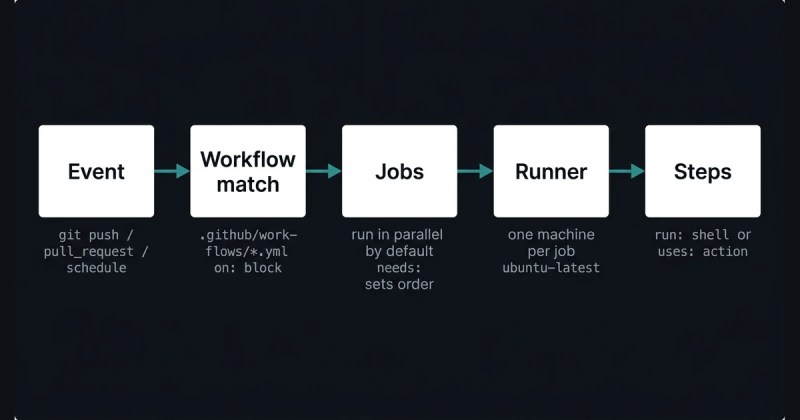
New to the split between the version control tool and the hosting platform? The difference between Git and GitHub for beginners is worth ten minutes first. Everything below assumes you know which is which.
Verdict: if you cannot draw this chain from memory, every debugging session starts from zero. Learn it once and the error messages start making sense.
Which Git branching model should you use?
For most teams, use GitHub Flow: one long-lived main branch, short-lived feature branches, and a merge through a pull request once checks pass. Trunk-based development goes further, with everyone committing to main several times a day behind feature flags, and it suits teams that ship continuously. Git Flow, with its develop and release branches, only earns its complexity if you ship versioned software to customers who run several versions at once.
| Model | Branch structure | Best for | Main cost |
|---|---|---|---|
| GitHub Flow | main + short feature branches |
Most web teams, continuous deployment | Needs solid PR checks |
| Trunk-based | main only, feature flags |
Fast-moving teams, many deploys a day | Requires a fast, trusted test suite |
| Git Flow | main, develop, release/*, hotfix/* |
Versioned/on-prem software, parallel releases | Heavy branch bookkeeping |
GitHub Flow works because there is only one integration point. A branch is either merged or it is not. The risk is that a weak test suite lets broken code into main, so the model leans on branch protection to hold the line.
Trunk-based development removes even the feature branch. Work goes straight to main behind a flag that is off in production until the feature is ready. In practice, this keeps merge conflicts tiny because nothing diverges for long. But the price is discipline. Your pipeline has to catch regressions on every commit, because there is no staging branch to catch them later.
Git Flow is the odd one out in 2026. It was designed for scheduled, versioned releases, and it still fits that case. But for a team deploying a web app several times a week, the develop-to-release-to-main promotion path is bureaucracy with no payoff. For example commands per model, see the full breakdown of Git Flow, GitHub Flow, and trunk-based development. Pair it with a review of your branching and merging strategies. The branching and approval best practices guide covers how to enforce whichever one you pick.
Verdict: default to GitHub Flow. Move to trunk-based only when your test suite is fast and trustworthy enough to gate main directly. Reach for Git Flow only if you genuinely support multiple released versions.
When should you rebase instead of merge?
Rebase to clean up your own local commits before you share them. Merge to combine branches that other people have already pulled. The Pro Git book states the rule plainly: “Do not rebase commits that exist outside your repository and that people may have based work on.” Break it and teammates get duplicate commits, a broken history, and merge conflicts that should not exist.
Rebase and merge do different things. A merge performs a three-way merge between the two branch tips and their common ancestor, then records a new merge commit. A rebase takes the diffs your branch introduced, resets your branch to the target, and replays each diff on top. As the book puts it: “Rebasing replays changes from one line of work onto another in the order they were introduced, whereas merging takes the endpoints and merges them together.”
The everyday use is keeping a feature branch current:
git checkout feature/login

git rebase main
That replays your login work on top of the latest main, so the eventual pull request is a clean diff with no merge commits in the middle. You can make git pull do this automatically:
git config --global pull.rebase true⚠️ Note: rebasing a branch you have already pushed and that a teammate has pulled means force-pushing over shared history. Their next git pull brings back your old commits alongside your rewritten ones, and now the branch has both. The recovery is git pull --rebase, which uses patch-id checksums to spot and drop the duplicates, but it is friction nobody wanted.
The safe boundary is simple. Rebase commits that have never left your machine, or that are pushed but that nobody has based work on. For the mechanics of interactive rebase, stash, and cherry-pick, see advanced Git rebase, stash, and cherry-pick. To tidy a messy branch into one commit before review, squash the feature branch instead of rebasing interactively. When a rebase or merge does collide, resolving merge conflicts in Git walks through the markers and the fix.
Verdict: rebase before the first push, merge after. The pull-request merge button is a merge, and that is correct — leave it alone.
What are Git hooks actually good for?
Git hooks run your own scripts automatically at points in the Git lifecycle: before a commit, before a push, after a merge. The useful ones are pre-commit for linting and formatting, commit-msg for enforcing a message format, and pre-push for a fast smoke test. One catch decides how you use them. Hooks live in .git/hooks and are never copied on clone, so a hook on your machine does nothing for anyone else.
When you run git init, Git fills .git/hooks with example scripts that end in .sample. Drop the suffix and make the file executable to activate one. Any language works. If the script exits non-zero, Git aborts the operation — a failing pre-commit stops the commit, a failing pre-push stops the push. Anyone can skip a client-side hook with git commit --no-verify, so a hook is a convenience, not a gate.
Because hooks are not version-controlled, teams share them one of two ways. First, you can commit hook scripts to a tracked folder and point Git at it with git config core.hooksPath .githooks. Or you can use a manager like pre-commit or Husky that wires itself in during a setup step. Either way, keep hook work fast. A pre-commit that runs the full test suite trains people to use --no-verify every time.
Server-side hooks (pre-receive, update, post-receive) run on the remote and cannot be bypassed, but on GitHub you do not manage those directly — branch protection and Actions cover the same ground. For working examples of each client-side hook, see Git hooks with real scripts, and check the official Git hooks reference for the full list and their arguments.
Verdict: use hooks for fast local checks only, and manage them with a tool so the whole team gets them. Real enforcement belongs in GitHub Actions and branch protection, not a hook that --no-verify skips.
How are GitHub Actions workflows structured?
A workflow is a YAML file in .github/workflows/. It needs three pieces: on: for what triggers it, jobs: for the units of work, and inside each job, runs-on: for the runner and steps: for the commands. Jobs run in parallel by default. Add needs: to make one job wait for another. Everything else — env:, permissions:, concurrency:, strategy.matrix: — is optional tuning.
name: CI

on:

  push:

    branches: [main]

  pull_request:


permissions:

  contents: read


jobs:

  test:

    runs-on: ubuntu-latest

    timeout-minutes: 15

    steps:

      - uses: actions/checkout@v4

      - uses: actions/setup-node@v4

        with:

          node-version: 22

      - run: npm ci

      - run: npm test
The triggers you will actually use are push, pull_request, schedule (POSIX cron, minimum five-minute intervals), workflow_dispatch for a manual run, and workflow_call to be invoked by another workflow. Branch and path filters narrow it further, so a docs-only change need not run the full build.
Two tuning keys matter early. concurrency groups runs so a new push cancels the in-progress one for the same branch:
concurrency:

  group: ${{ github.workflow }}-${{ github.ref }}

  cancel-in-progress: true
timeout-minutes caps a job. Without it, the platform still kills the job at six hours, but by then you have burned a runner for nothing. Environment variables follow a precedence order: a step-level env beats a job-level one, which beats the workflow level.
For the full syntax with every key explained, see the workflow YAML guide. If you have never built one, your first CI/CD pipeline starts from an empty repo, and an introduction to automating your workflow covers the concepts. Real patterns live in common use cases and examples.
Verdict: keep one workflow per purpose — CI, release, scheduled maintenance — not one file with twenty conditional jobs. Small files are far easier to reason about when a run fails at 2 a.m.
Reusable workflows, composite actions, or a matrix: which one?
Use a matrix when you run the same job across variations, like Node 18, 20, and 22, or three operating systems. A composite action fits a sequence of steps you repeat inside one repository, such as checkout, language setup, and cache restore. Reach for a reusable workflow when whole jobs need to be shared across many repositories. They solve different problems and often show up together.
| Mechanism | Scope | What it shares | Called with |
|---|---|---|---|
strategy.matrix |
One job, many variants | Nothing — same steps, different inputs | Built into the job |
| Composite action | Within or across repos | A sequence of steps | uses: at the step level |
| Reusable workflow | Across repos | Whole jobs, with inputs and secrets | uses: at the job level, secrets: inherit |
A matrix is the simplest and the one to try first:
strategy:

  matrix:

    node: [18, 20, 22]
That runs the job three times in parallel. Because a matrix caps at 256 jobs per workflow run, a two-dimensional matrix across many values adds up faster than people expect.
Composite actions bundle steps into an action.yml file so a repo can call uses: ./.github/actions/setup instead of repeating six lines. The reusable workflow is a full workflow with on: workflow_call, typed inputs, and either explicit secrets or secrets: inherit. It is how a platform team standardizes CI across forty services. The reusable workflows and composite actions guide has working examples of both.
Verdict: reach for a matrix first. Build a composite action or a reusable workflow only once you are copy-pasting the same block into a third place.
How should GitHub Actions handle secrets and cloud auth?
Stop storing long-lived cloud keys as repository secrets. Use OpenID Connect (OIDC): the workflow requests a short-lived token from AWS, Azure, or Google Cloud at run time, scoped to that repository and branch. For everything else, keep the GITHUB_TOKEN read-only by default and raise permissions per job. Never pass a secret as a command-line argument, because another job on the same runner can read it with ps x -w.
GitHub’s own hardening guide is direct about the risks. It says automatic redaction “is not guaranteed,” so mask anything sensitive that is not already a GitHub secret with the ::add-mask:: workflow command. It also says “Never use structured data as a secret” — a JSON or YAML blob lowers the odds that redaction catches every piece of it. Create one secret per value.
The permissions key is the single highest-value line in most workflows:
permissions:

  contents: read

  id-token: write   # only in the job that needs OIDC
GitHub flipped the GITHUB_TOKEN default to read-only for new repositories in 2023. But organizations created before February 2023 may still default to read-write. So check your organization’s Actions settings and set it explicitly.
OIDC removes the stored key entirely. The workflow proves its identity to the cloud provider, which hands back a token that expires in minutes. GitHub’s docs recommend it directly for any workflow that deploys to a cloud provider or uses HashiCorp Vault. One caveat: “Support for custom claims for OIDC is unavailable in AWS.” So scope AWS trust policies on the standard subject claim.
For the day-to-day rules, see managing workflow secrets safely and the wider security best practices checklist. The official security-hardening docs are the source for all of the above.
Verdict: OIDC for cloud, a read-only GITHUB_TOKEN everywhere, and third-party actions pinned to a commit SHA. The section on what breaks explains why that last one is not optional.
How does GitHub Actions caching work, and what does it cost?
The actions/cache action stores a directory keyed by a hash, usually of your lockfile, and restores it on the next run. Each repository gets 10 GB of cache. GitHub deletes any cache not accessed in seven days. Once a repo passes 10 GB, it evicts entries “in order of last access date, from oldest to most recent.” A pull request can restore caches from its own branch, the default branch, and its base branch. It cannot read caches from sibling or child branches.
- uses: actions/cache@v4

  with:

    path: ~/.npm

    key: npm-${{ hashFiles('package-lock.json') }}

    restore-keys: |

      npm-
The action looks for an exact key match first, then partial matches, then each restore-keys prefix in turn. A key can be up to 512 characters. The cache is best-effort: a miss should slow the build, never break it.
⚠️ Note: caches are not private within a repo. The docs are explicit: “Anyone who can open a pull request against your repository can read the contents of caches in the base branch.” Do not cache credentials, tokens, or anything derived from a secret.
For key design and layered caching strategies, see caching and performance tuning. The official caching docs cover cross-OS archives and rate limits.
Verdict: cache dependency downloads, never build output you cannot trust to be stale. If a cache miss breaks your build, the build was already broken.
How do you enforce that tests pass and the right people review?
Enforcement lives in branch protection, not the workflow file. In the protected branch’s rule, mark specific status checks as required, and the merge button stays disabled until they pass. Add a CODEOWNERS file to require a named team’s review on the paths they own. For a monorepo, path filters plus per-path approval rules stop a frontend change from needing the database team’s sign-off.
Required status checks are matched by job name. That creates a quiet trap. Rename a job in the workflow and the required check no longer matches, so the rule silently stops enforcing anything. So keep job names stable, or update the branch rule in the same change.
A CODEOWNERS file at .github/CODEOWNERS maps globs to owners:
/api/        @org/backend

/web/        @org/frontend

*.tf         @org/platform
With “Require review from Code Owners” enabled, a pull request touching /api/ needs a @org/backend approval before merge. The CODEOWNERS and review permissions guide covers the syntax edge cases, and path-based approval rules show how to scope checks per directory.
Two more pieces round this out. The guide to running unit tests in CI covers wiring the test job so its result is a usable status check. And pull request and issue templates give reviewers a checklist, so “looks fine” reviews get rarer.
Verdict: a test that is not a required status check is a suggestion. Wire the check into branch protection, or accept that people will merge red.
How do GitHub Actions deployment environments work?
An environment is a named deployment target — staging, production — with its own secrets and protection rules. A job that sets environment: production pauses until its rules pass: required reviewers approve, a wait timer elapses, or the branch matches an allowed pattern. Environment secrets are visible only to jobs targeting that environment, which keeps production credentials out of every other run.
deploy:

  runs-on: ubuntu-latest

  environment: production

  concurrency: production

  steps:

    - run: ./deploy.sh
The environment line does two things: it gates the job behind the environment’s rules, and it scopes which secrets the job can read. The concurrency: production line stops two deploys running at once, so a fast follow-up merge queues behind the current release instead of racing it.
Rolling, blue-green, and canary deploys are not features you toggle. You build them by calling your platform’s CLI or API across environment-scoped jobs, with the environment gate providing the human checkpoint. Tag-based releases fit here too — cutting a release from a Git tag is a clean trigger for a production workflow. The deployment strategies and environments guide walks through each pattern, and automating releases covers changelog and versioning steps.
Verdict: put every deploy behind an environment with at least one required reviewer for production. It is the cheapest safety net Actions gives you.
What actually breaks GitHub Actions in production?
Four failure modes show up again and again: a compromised third-party action leaking secrets, a pull_request_target workflow running attacker code, caches vanishing mid-sprint, and jobs silently hitting a platform limit. None of these appear in a tutorial. All of them have cost real teams real incidents.
A compromised action dumps your secrets into the logs
In March 2025, the widely used tj-actions/changed-files action was compromised (CVE-2025-30066). An attacker repointed every tag from v1 through v45.0.7 to a single malicious commit, 0e58ed8. The injected code read secrets out of the runner’s memory and printed them into the workflow log, which is public on any public repository. More than 23,000 repositories ran the poisoned version before it was caught. The fix shipped as v46.0.1, and CISA advised every affected project to rotate every credential the workflow could touch during the window.
The defense is pinning. A tag is a movable pointer; a commit SHA is not.
# vulnerable — a tag can be repointed

- uses: tj-actions/changed-files@v45


# safe — an immutable reference

- uses: tj-actions/changed-files@a5b3c1d2e4f5...
GitHub’s hardening guide says a full-length commit SHA “is currently the only way to use an action as an immutable release.” Turn on Dependabot so a known-bad version gets flagged, and audit that the SHA belongs to the action’s real repository, not a fork.
pull_request_target runs code from the fork with your token
The pull_request_target trigger runs with your repository’s secrets and a writable GITHUB_TOKEN, but in the base repository’s context, so it can comment on or label a pull request from a fork. The danger is checking out the pull request’s head and then running anything from it:
# dangerous pattern

on: pull_request_target

jobs:

  build:

    steps:

      - uses: actions/checkout@v4

        with:

          ref: ${{ github.event.pull_request.head.sha }}

      - run: npm ci && npm run build
That npm ci runs postinstall scripts from an attacker’s branch, with your secrets in scope. Security researchers used exactly this pattern to reach remote code execution in workflows at Microsoft, Google, and Nvidia. The rule from GitHub’s docs: workflows using these triggers “must not explicitly check out untrusted code.” Use plain pull_request for anything that runs a contributor’s code — it has no secrets and a read-only token — and move any privileged follow-up into a separate workflow_run workflow.
Your cache disappears the week you need it
The seven-day eviction plus the 10 GB cap means a cache you depend on can vanish after a quiet week, and a busy monorepo can evict its own caches within a day as new entries push old ones out. The symptom is CI time doubling overnight with no code change and no alert. Check the repository’s cache list when build times jump:
gh cache list --repo owner/nameScope keys tightly so unrelated changes do not invalidate everything, and design the build so a cold cache is slow but still green.
A job hits a limit and just stops
These limits have no loud error. A job is killed at six hours of execution time. Queued jobs are cancelled after 24 hours waiting for a runner. Matrix builds cap at 256 jobs per run. Concurrent jobs cap at 20 on Free, 40 on Pro, 60 on Team, and 500 on Enterprise, so a large matrix on a Free plan queues behind itself. The GITHUB_TOKEN also gets 1,000 API requests per hour per repository, so a workflow that loops over the API can start returning 403s late in the run.
Set an explicit timeout-minutes well under six hours so a hung job fails fast, keep matrices small, and know your plan’s concurrency number before you fan out. The monitoring and debugging guide covers reading run logs when a job ends without an obvious reason. For the repository side of the same problem, see Git security best practices.
Verdict: pin actions to SHAs, keep untrusted code out of privileged triggers, and assume every cache and every runner is about to disappear. Design for that and GitHub Actions is boringly reliable.
Frequently Asked Questions
Q: Do I need GitHub Actions if I already use Git?
A: Git tracks code history; GitHub Actions automates what happens to that code. You can use Git alone, but you lose automated tests on every pull request, one-click deploys, and required checks that block bad merges. For a solo project it is optional. For a team, that automation is what keeps main releasable.
Q: Is rebase or merge better for a team?
A: Both, at different times. Rebase your own local commits to tidy them before the first push. Merge branches once other people have pulled them. The pull-request merge button is a merge and should stay that way. Never rebase a branch someone else has already based work on.
Q: How do I stop a third-party GitHub Action from stealing secrets?
A: Pin it to a full commit SHA, not a tag. A tag can be repointed to malicious code, as the tj-actions/changed-files compromise showed in 2025. Set the GITHUB_TOKEN to read-only, grant write access per job, and use OIDC instead of stored cloud keys. Turn on Dependabot to flag known-bad versions.
Q: Why did my GitHub Actions build suddenly get slower?
A: The most common cause is cache eviction. GitHub deletes caches not used in seven days and evicts the oldest once a repository passes 10 GB. A quiet week or a busy monorepo can wipe the cache you rely on, doubling build time with no code change and no alert. Check gh cache list.
Q: Where should I enforce that tests pass before a merge?
A: In branch protection, not the workflow file. Mark the test job as a required status check on the protected branch, and the merge button stays disabled until it passes. A workflow that runs tests but is not wired into branch protection does nothing to stop a red merge.
Quick Summary:
– GitHub Flow — one main, short-lived feature branches, merge via pull request — is the right default. Move to trunk-based only with a fast, trusted test suite.
– Rebase local commits before the first push; merge anything already shared. The Pro Git rule: never rebase commits others may have based work on.
– Pin third-party actions to a full commit SHA. The tj-actions/changed-files compromise (CVE-2025-30066, March 2025) repointed every tag to secret-stealing code across 23,000+ repositories.
– GitHub Actions caches are 10 GB per repository and evicted after seven days unused. A build that slows overnight with no code change is usually a lost cache.
– Real enforcement lives in branch protection. A test that is not a required status check will not stop a red merge, and deploys belong behind an environment with a required reviewer.
Working through one of these decisions now? Start with the branching model — the three-model breakdown has the commands for each. Then wire your test job into branch protection before you touch anything else.
Related guides
- GitHub Actions interview questions — GitHub Actions Interview Questions and Answers
- build and publish Docker images with GitHub Actions — Automating Docker Image Build and Publish Pipeline with GitHub Actions: GCR
- Cloud Run deployment with GitHub Actions — Simplifying GCP Cloud Run Deployment with GitHub Actions